
.webp?width=1200&height=698&name=menu%20item%20-%20fashion%20(1).webp)






.webp?width=1200&height=544&name=menu%20item%20-%20collaboration%20(2).webp)
.webp?width=1200&height=544&name=menu%20item%20-%20samples%20(1).webp)
.webp?width=1200&height=544&name=menu%20item%20-%20profit%20%26%20margins%20(1).webp)
.webp?width=1200&height=544&name=menu%20item%20-%20compliance%20(1).webp)






Feature Release

6 minute read
Copenhagen, Denmark - April 2026 - Delogue is introducing Bulk Edit, a new feature designed to simplify how brands manage product data across styles and items.
Built as part of Delogue 2.0, Bulk Edit brings a faster, more flexible way of working with large datasets, helping teams move from repetitive manual updates to efficient, structured workflows.
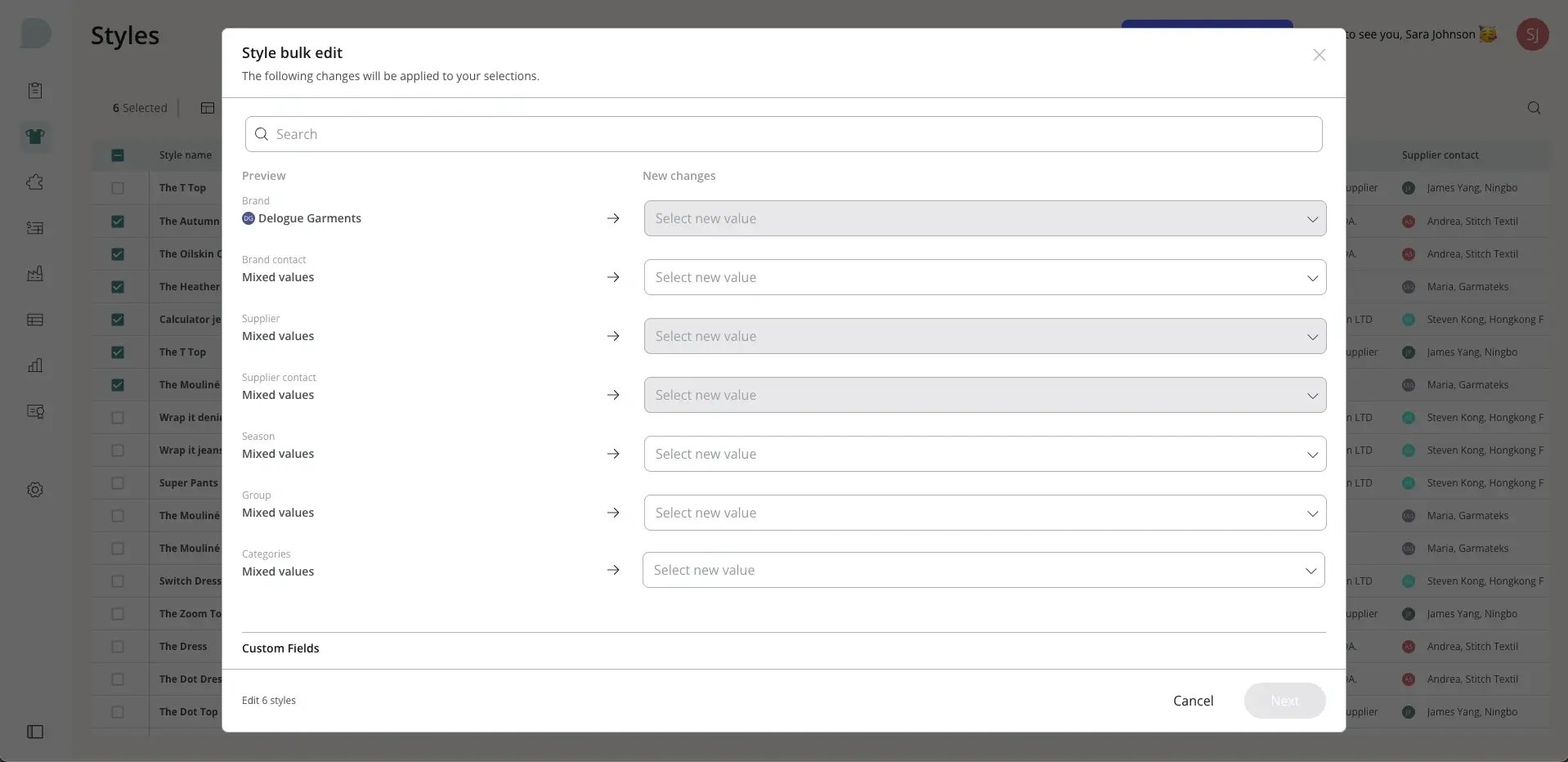
Rather than updating styles one by one, Bulk Edit allows users to make changes across multiple records in a single action.
A faster way to manage product data
For many teams, updating product data has been a time-consuming process. Changes to categories, contacts, statuses or custom fields often require opening each style individually. Bulk Edit launching 29 April changes that.
With the new feature, users can now select multiple styles or items and apply updates instantly, directly within the platform. What previously took hours can now be done in minutes. Built into a new and improved table view in Delogue 2.0, users can customise which columns to display and filter data to find exactly what they need, then apply changes immediately in the same view.
Users can also save and reuse filter and column configurations, making it easier to return to frequently used views and workflows without having to rebuild them each time.
All updates are reviewed before being applied, and every edit is logged automatically, ensuring full transparency and traceability.
Clear values, not just overwrite them
Bulk Edit is not only about updating data, it is also about clearing it. Users can now empty a field across multiple styles in a single action, rather than opening each style to remove a value by hand.
Whether resetting fields at the start of a new season or correcting information added by mistake, clearing works across dropdown, text, numeric and date fields. As with every bulk update, changes are confirmed before they are applied and logged automatically, so emptying a field stays just as safe and traceable as filling one in.
Smarter handling of custom fields
Many teams use custom fields that apply only to a specific brand, group or category, so not every field is relevant to every style. Bulk Edit now understands this.
The table clearly shows which fields apply to each style, and the Bulk Edit view displays only the fields relevant to the styles you have selected. A field can be edited only when it applies to every style in the selection, so teams always know what they can see, what they can edit and why, and updates are never applied where they do not belong.
Built for everyday workflows
Bulk Edit is designed for the tasks teams handle every day, from updating seasonal information to managing product data and custom fields.
A typical use case could be updating a category or contact across multiple styles. Instead of opening each style individually, users can filter, select and update everything in one action.
The result is a faster, more confident workflow, with fewer workarounds and less time spent switching between tabs.
Key bulk edit features
- Update multiple styles or items in one action
- Clear values in bulk, not just overwrite them
- Edit brand, group and category-specific custom fields safely
- Customise visible columns to match your workflow
- Filter data efficiently to find the right records
- Save and reuse filter and column configurations
- Review all changes before applying them
- Automatic logging for full traceability
For anyone interested in discovering more about Delogue PLM, we welcome you to send your inquiries to our sales team at sales@delogue.com.
Check out our live sessions
Whether we’re introducing new features or sharing helpful tips and tricks, we host monthly live sessions to walk you through Delogue.
Explore this month’s sessions and webinars by clicking the button below.