
.webp)
.webp)
.webp?width=600&height=349&name=menu%20item%20-%20fashion%20(1).webp)






.webp?width=2000&name=menu%20item%20-%20collaboration%20(2).webp)
.webp?width=2000&name=menu%20item%20-%20samples%20(1).webp)
.webp?width=2000&name=menu%20item%20-%20profit%20%26%20margins%20(1).webp)
.webp?width=2000&name=menu%20item%20-%20compliance%20(1).webp)







Feature Release

3 minute read
Copenhagen, Denmark - April 2026 - Delogue is introducing Bulk Edit, a new feature designed to simplify how brands manage product data across styles and items.
Built as part of Delogue 2.0, Bulk Edit brings a faster, more flexible way of working with large datasets, helping teams move from repetitive manual updates to efficient, structured workflows.
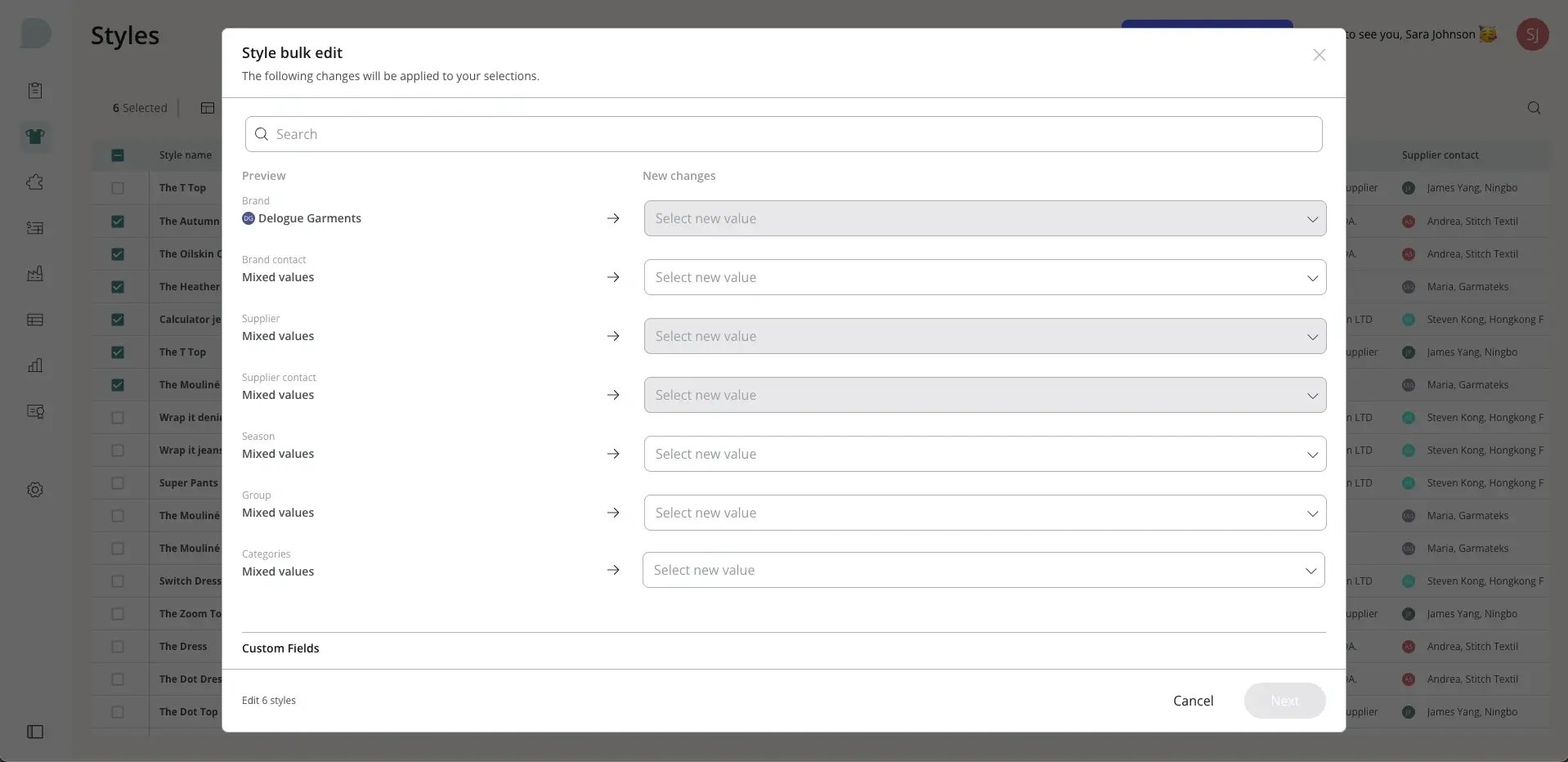
Rather than updating styles one by one, Bulk Edit allows users to make changes across multiple records in a single action.
A faster way to manage product data
For many teams, updating product data has been a time-consuming process. Changes to categories, contacts, statuses or custom fields often require opening each style individually. Bulk Edit launching 29 April changes that.
With the new feature, users can now select multiple styles or items and apply updates instantly, directly within the platform. What previously took hours can now be done in minutes. Built into a new and improved table view in Delogue 2.0, users can customise which columns to display and filter data to find exactly what they need, then apply changes immediately in the same view.
Users can also save and reuse filter and column configurations, making it easier to return to frequently used views and workflows without having to rebuild them each time.
All updates are reviewed before being applied, and every edit is logged automatically, ensuring full transparency and traceability.
Built for everyday workflows
Bulk Edit is designed for the tasks teams handle every day, from updating seasonal information to managing product data and custom fields.
A typical use case could be updating a category or contact across multiple styles. Instead of opening each style individually, users can filter, select and update everything in one action.
The result is a faster, more confident workflow, with fewer workarounds and less time spent switching between tabs.
Key bulk edit features
- Update multiple styles or items in one action
- Customise visible columns to match your workflow
- Filter data efficiently to find the right records
- Save and reuse filter and column configurations
- Review all changes before applying them
- Automatic logging for full traceability
For anyone interested in discovering more about Delogue PLM, we welcome you to send your inquiries to our sales team at sales@delogue.com.
Check out our live sessions
Whether we’re introducing new features or sharing helpful tips and tricks, we host monthly live sessions to walk you through Delogue.
Explore this month’s sessions and webinars by clicking the button below.